
BUILD A CMA.
DEFEND THE PRICE.
Learn to build a credible Comparative Market Analysis in REALTORS® Property Resource (RPR)—then turn it into a clear, confident Frontline listing conversation.
YOUR NEXT MOVE STARTS HERE.
Three practical paths. Your progress stays in this browser—not in RPR or the Frontline Business Planner.
FOLLOW THE WORKFLOW
Follow official RPR screenshots and a real Strongsville example to a seller-ready PDF handoff.
CHALLENGE YOUR JUDGMENT
Practice comp selection, adjustment direction, pricing, and report decisions.
CLEAR THE QUALITY GATE
Use the final eight-point checklist before you bring the report to a seller.
ONE HOUSE.
ONE COMPLETE WORKFLOW.
Use the same property as your search example while following the verified RPR screenshots below. Work in your own RPR account and capture your own report. No RPR account, valuation, or selected comparables have been generated for this case.
Which square footage should you use?
The public listing page displays 2,400 sq ft in its overview while its description identifies 1,830 above-grade sq ft plus 751 sq ft of basement. Those figures are not automatically interchangeable. In RPR, compare the MLS record, property facts, building area definitions, and available assessor records. Verify before adjusting the subject or comparing $/sq ft.
These are figures quoted from one public listing source, not facts independently verified in RPR. Do not assume the correct answer from this Playbook.
This example is a retrospective teaching exercise involving a closed property. Do not treat its reported sale price as today's list recommendation or choose comps solely to replicate that sale.
THE CMA MISSION PATH.
Use each official screenshot as a visual landmark. Apply the action to the Strongsville case, then confirm the field checks to advance. Screenshots are RPR help examples, not a live CMA for the training address.
Access RPR.
Find the property. Verify your account.
Begin at RPR, not with an automated price. The subject property and its data must be correct before the CMA has meaning.
What you should see in RPR
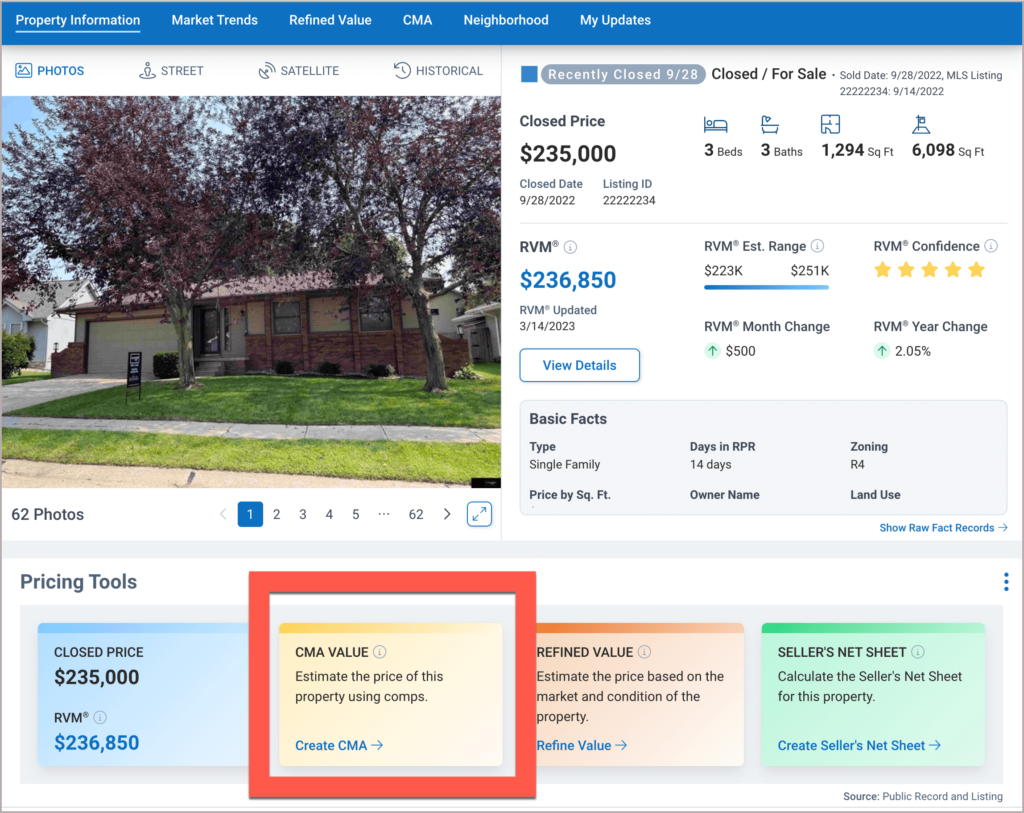
These are real screenshots published by RPR for its training documentation (older CMA examples and newer report editor). They do not show a CMA completed for 14194 Pine Lakes Drive, and the current logged-in interface may differ. Compare section labels in your own account. RPR step-by-step source ↗
- 01Open RPR and sign in with your own REALTOR® account.
- 02Search the subject property using the residential property search.
- 03Open the correct Property Details page. Confirm the address and property type.
- 04Find Pricing Tools and choose Create CMA.
Confirm facts.
Clean inputs make defensible comps.
RPR asks you to confirm the home facts before it searches for comparable properties. Treat this as a research step, not a click-through.
What you should see in RPR
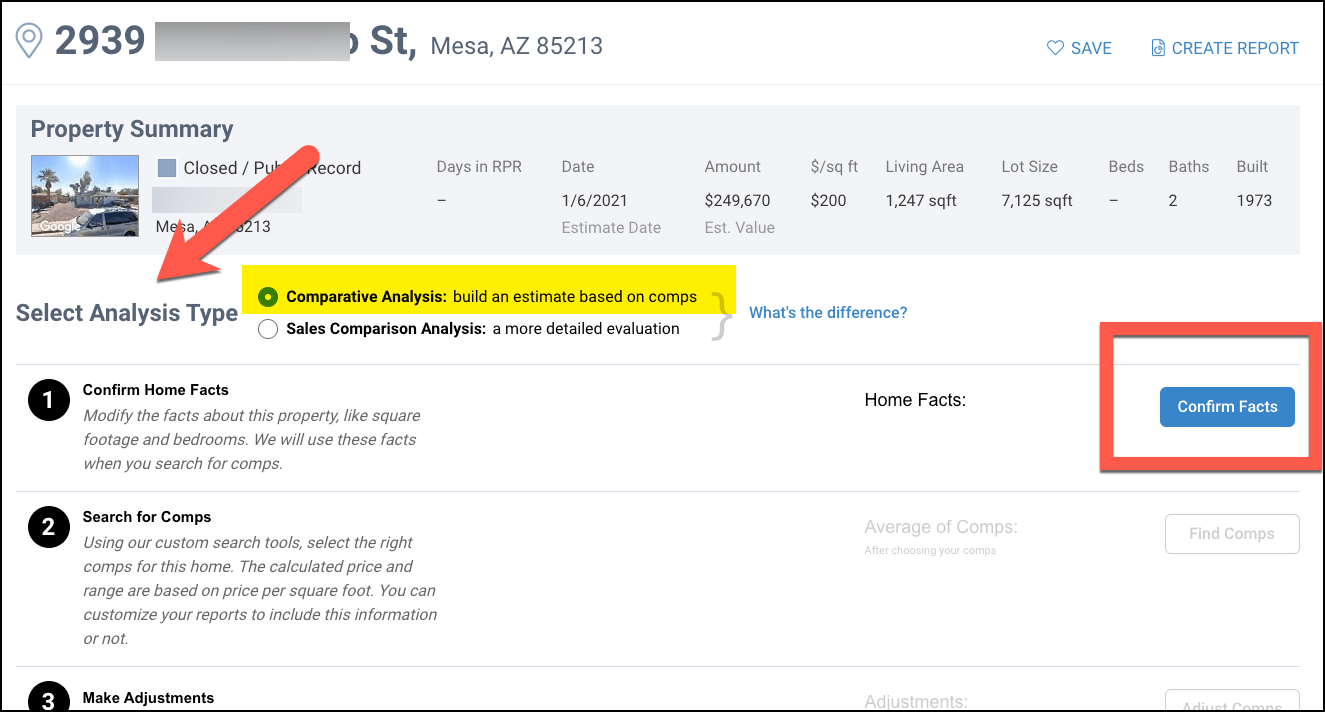

These are real screenshots published by RPR for its training documentation (older CMA examples and newer report editor). They do not show a CMA completed for 14194 Pine Lakes Drive, and the current logged-in interface may differ. Compare section labels in your own account. RPR step-by-step source ↗
- 01Under Select Analysis Type choose Comparative Analysis (standard CMA) for this training path.
- 02Select Confirm Facts and review the property record.
- 03Compare living area, beds, baths, lot, year built, and relevant condition details against verified evidence.
- 04Use the Your Changes column to correct or complete facts; starred facts are used to pull comps.
- 05Select Confirm Facts and Close.
Find comps.
Select evidence—not just nearby homes.
RPR lets you apply filters, use a map and add a known property. Frontline’s standard is to choose the most relevant comps and explain why each belongs.
What you should see in RPR
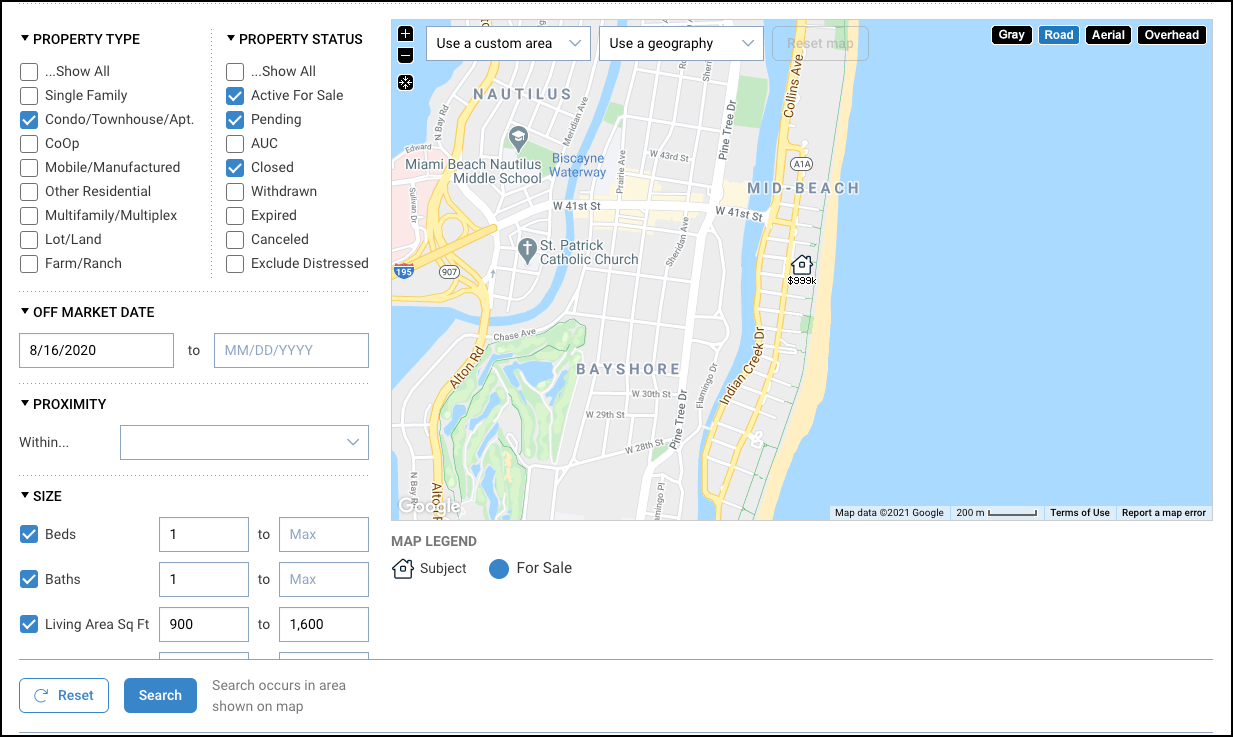


These are real screenshots published by RPR for its training documentation (older CMA examples and newer report editor). They do not show a CMA completed for 14194 Pine Lakes Drive, and the current logged-in interface may differ. Compare section labels in your own account. RPR step-by-step source ↗
- 01Select Find Comps. Review the map area and filter panel.
- 02Apply appropriate filters; RPR only applies a filter when its checkbox is selected.
- 03Start with the closest relevant recent sold homes, then expand geographically or by time only when justified.
- 04Open candidate property details; compare condition, layout, size, site, timing, concessions and special features.
- 05Check Add to Comps List for selected properties; use Add a known property for a specific address or MLS ID.
- 06Aim for 3–5 strong anchor comps when sufficient evidence exists. Record why each was chosen.
- 07Select Update Valuation and Close.
Adjust comps.
Translate differences with judgment.
The standard RPR CMA uses simple relative-rating sliders. Adjustments should follow observable property differences, not an outcome you are trying to force.
What you should see in RPR

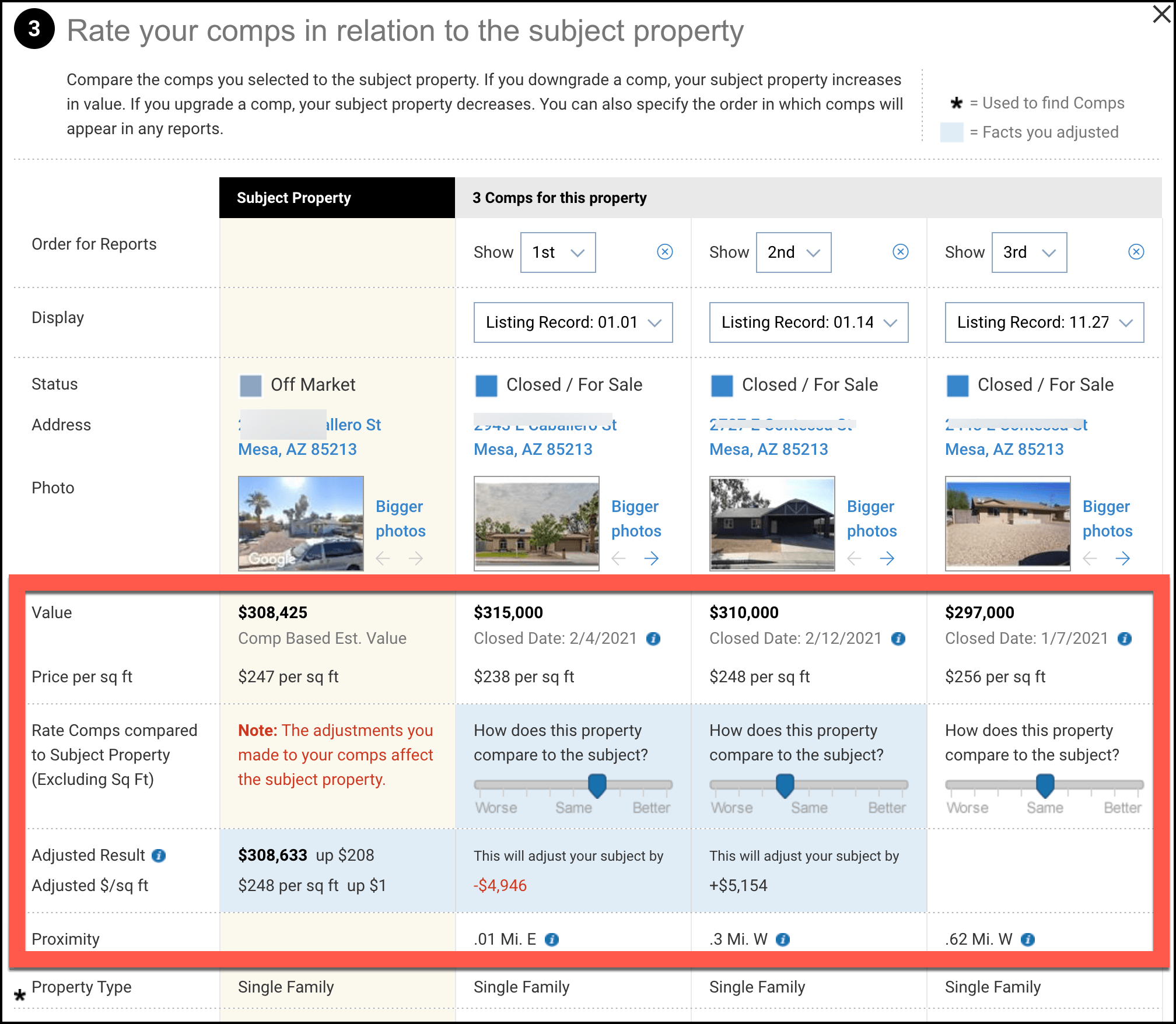
These are real screenshots published by RPR for its training documentation (older CMA examples and newer report editor). They do not show a CMA completed for 14194 Pine Lakes Drive, and the current logged-in interface may differ. Compare section labels in your own account. RPR step-by-step source ↗
- 01Select Adjust Comps and examine each selected property beside the subject.
- 02If a comp is inferior to the subject, move its slider left: that increases the subject estimate.
- 03If a comp is superior to the subject, move its slider right: that decreases the subject estimate.
- 04RPR says each slider tick is about 5%, up to approximately ±20%. Make only supportable changes.
- 05Consider any additional comp notes or order, then select Update Valuation and Close.
Review result.
Convert a calculation into a pricing position.
RPR calculates a CMA result and range, but you own the professional recommendation. Compare the result against your verified market evidence.
What you should see in RPR
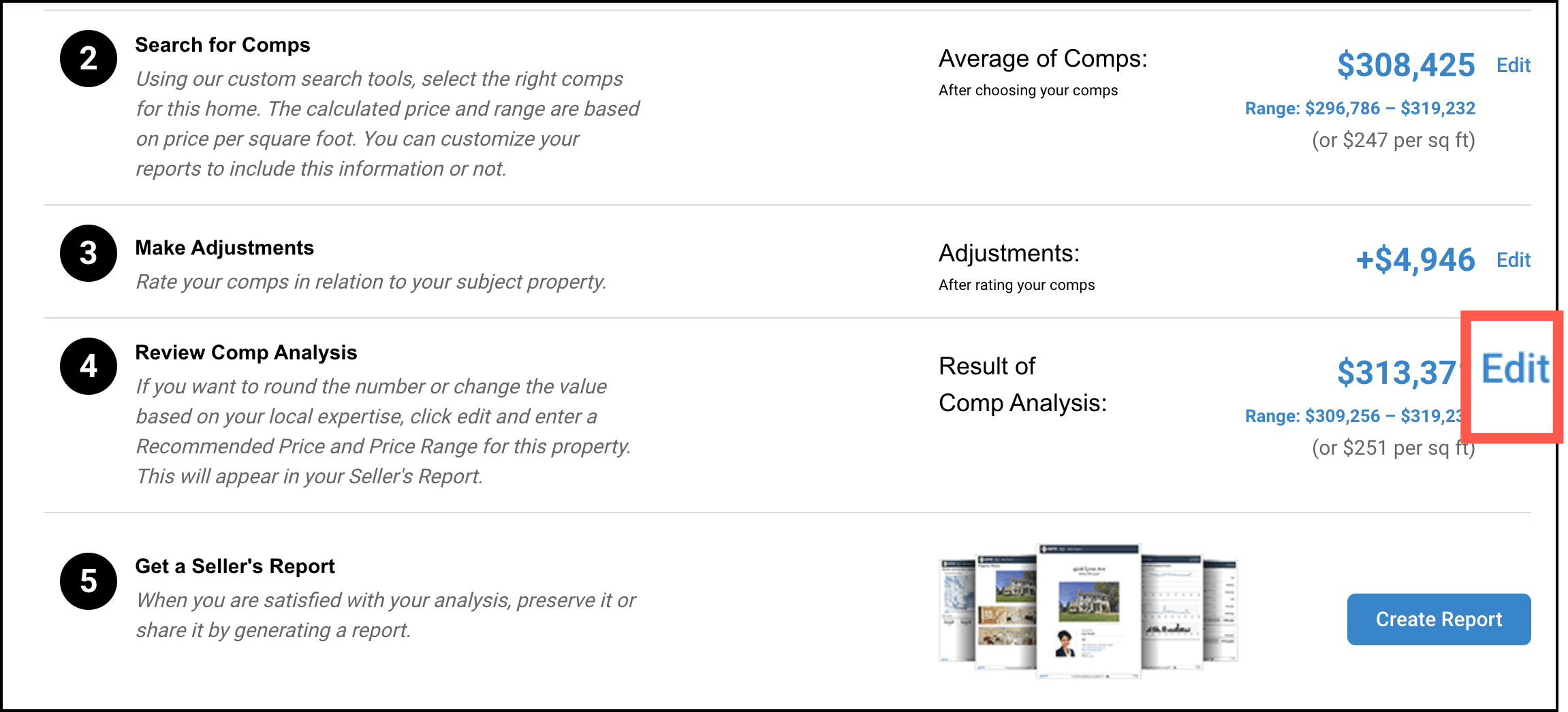

These are real screenshots published by RPR for its training documentation (older CMA examples and newer report editor). They do not show a CMA completed for 14194 Pine Lakes Drive, and the current logged-in interface may differ. Compare section labels in your own account. RPR step-by-step source ↗
- 01Review the calculated CMA estimate and value range.
- 02Check whether the range makes sense against recent closed sales, market movement, and seller-specific condition.
- 03If needed, use Edit to adjust how the range is presented; document the evidence supporting your recommendation.
- 04Compare against active competition and pending signals without presenting their asking prices as sold results.
- 05Select Save after reviewing the result.
Create report.
Build a clear seller-ready PDF.
Use RPR’s report editor to turn your analysis into a client-readable summary. A compelling cover is not a substitute for a correct CMA.
What you should see in RPR
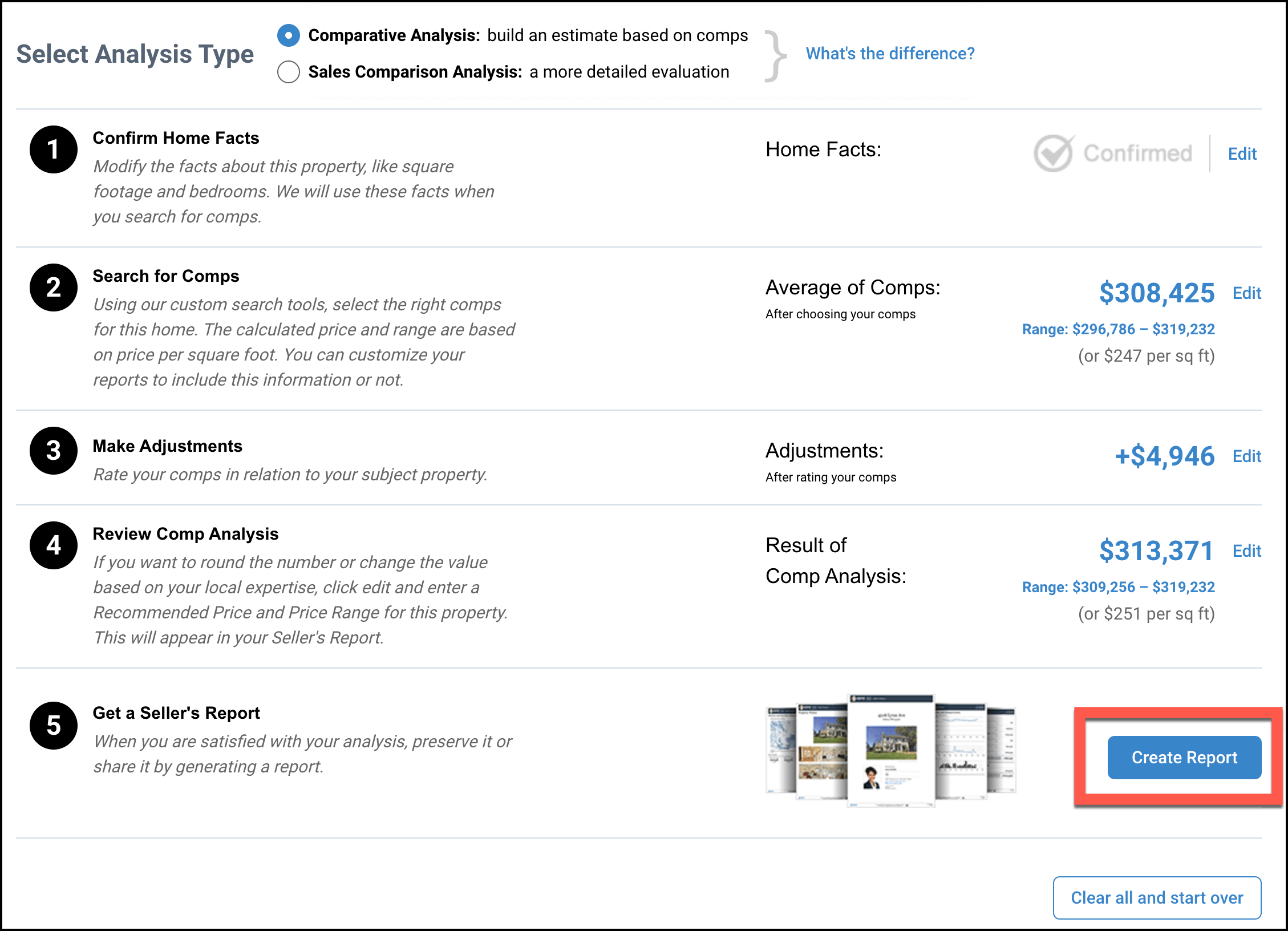

These are real screenshots published by RPR for its training documentation (older CMA examples and newer report editor). They do not show a CMA completed for 14194 Pine Lakes Drive, and the current logged-in interface may differ. Compare section labels in your own account. RPR step-by-step source ↗
- 01Choose Create Report and start with the Next Gen CMA Template (or Seller Template if appropriate).
- 02Review the property, comps, pricing summary, contact information and the RPR branding/profile in the editor.
- 03Customize report sections and order. If you want to emphasize only your CMA, RPR permits deselecting RVM®/AVM in applicable report sections.
- 04Run Report. Preview every page and check the property address, figures, photos, dates and comp set.
- 05Download the PDF to save a stable copy for the appointment. Rename with a non-sensitive, clear filename.
- 06Use link/email sharing only when appropriate—RPR report links may regenerate with updated data when opened later.
Frontline handoff.
Make the CMA work at the listing table.
RPR creates analysis evidence; Frontline agents verify and present it. The handoff to Listing Launch is manual, intentional and property-specific.
What you should see in RPR
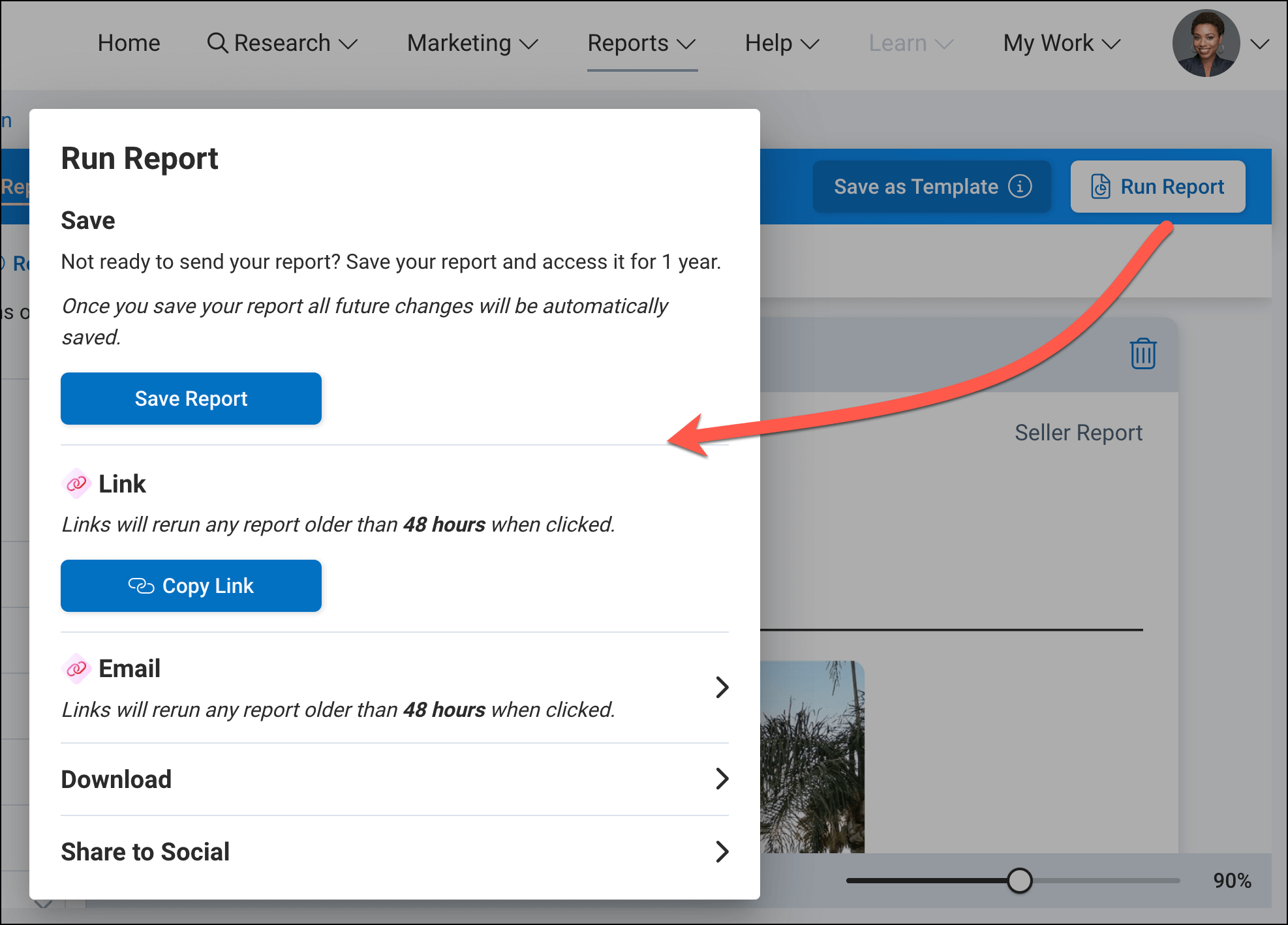
These are real screenshots published by RPR for its training documentation (older CMA examples and newer report editor). They do not show a CMA completed for 14194 Pine Lakes Drive, and the current logged-in interface may differ. Compare section labels in your own account. RPR step-by-step source ↗
- 01Confirm the report belongs to the correct seller/property, uses current information and contains no prior client’s records.
- 02Start a New Seller Session in Listing Launch so older property data does not carry forward.
- 03Use the Smart CMA PDF upload/review workflow where available; verify the extracted or displayed data before presenting.
- 04Keep live MLS available to explain current competition, pending activity and meaningful differences.
- 05Lead with the seller’s goals, then use CMA evidence to recommend a defensible launch position.
- 06After the appointment, record next steps and responsibilities in the Business Planner using the team workflow.
Reset these stage checks and quality confirmations before each new CMA.
YOU DRIVE THE CMA.
Search 14194 Pine Lakes Drive in your own RPR account. After verifying the facts, identify genuinely comparable closed sales. The worksheet is blank on purpose—no results or estimates are fabricated.
14194 Pine Lakes Drive
- Find the public record and listing record in RPR. Check the reported above-grade area and finished basement separately.
- Set a defensible geography and sold-date window. Expand only when you can explain why.
- Review at least five candidates; retain three to five meaningful comps and explain rejected candidates.
- Compare each retained comp on size, condition, improvements, location, and closing date.
- Apply only justified RPR adjustments and record your explanation.
- Review the pricing range and export a report; verify each page against the correct property.
“Which living-area figure did you use, what source supports it, and how would the alternative affect your price-per-square-foot comparison?”
Explain your evidence
| Candidate | Address / MLS | Close / status | Difference | Keep? Why? |
|---|---|---|---|---|
| A | _______________ | __________ | ____________ | ____________ |
| B | _______________ | __________ | ____________ | ____________ |
| C | _______________ | __________ | ____________ | ____________ |
| D | _______________ | __________ | ____________ | ____________ |
| E | _______________ | __________ | ____________ | ____________ |
This worksheet is intended for training notes only. Record actual data in authorized RPR / MLS systems. Do not enter confidential seller information into this page.
SELECT THE RIGHT EVIDENCE.
The best CMA is not the one with the most comps. It's the one whose evidence an agent can explain and defend.
ANCHOR COMPS BEFORE THE STORY.
Start with three to five well-matched closed sales when available. Compare location, condition, size, layout, age, site and concessions. Broaden the search only when necessary and explain why.
Illustrative priorities—not RPR scores or hard thresholds.RECENT SOLD
What buyers and sellers actually agreed to. Investigate material concessions and condition differences.
PENDING / UNDER CONTRACT
Signals current demand, but the agreed contract price may not be public or final.
ACTIVE LISTINGS
Shows what competing homes offer now—not what buyers have paid.
OUTLIERS & THIN MARKETS
New construction, acreage, major updates and unusual layouts may require a wider search and stronger documentation.
Standard CMA or Advanced CMA?
STANDARD CMA
Five-step workflow with relative comparison sliders. Choose when a clear, supportable set of comps and simple adjustments can explain the result.
ADVANCED CMA
Supports specific dollar adjustments and weighting comparables. Use when differences require a more granular documented analysis; weights must total 100%.
MAKE THE RIGHT CALL.
Six realistic decisions. Choose an answer before viewing the coaching, then retry until you understand the reasoning.
Property facts don't match
Correct drills are remembered on this device. This is a practice aid, not an official certification or evidence of supervised competency.
THE 8-POINT CMA CLEARANCE.
Run this every time you prepare a seller-specific report. Progress stays only in this browser tab and resets for a new CMA session.
Confirm. Verify. Present.
YOUR TRAINING TOOLBELT.
The interface may change. These links lead to official RPR instructions, with screenshots and current feature documentation.
RPR Member Support: (877) 977-7576, or use RPR Live Chat. This page is an independent Frontline internal training resource, not an official RPR interface.
FRONTLINE · RPR CMA FIELD CARD
RPR: narrpr.com/home · Support: 877-977-7576
THE FIVE OFFICIAL STEPS
- CONFIRM FACTS — Verify the subject; use Your Changes for corrections.
- FIND COMPS — Choose appropriate sold evidence; apply checked filters and map area.
- ADJUST COMPS — Inferior comp → left slider → subject estimate rises. Superior → right → falls.
- REVIEW RESULT — Analyze range and outliers; recommend with evidence.
- CREATE REPORT — Run Next Gen CMA or Seller Template; review and download PDF.
FRONTLINE HANDOFF
Verify every page. Begin a New Seller Session in Listing Launch. Present Smart CMA with a reviewed PDF, support with live MLS, then document follow-up in Business Planner.
Never promise sale price, substitute automated output for judgment, or expose other clients’ information.